

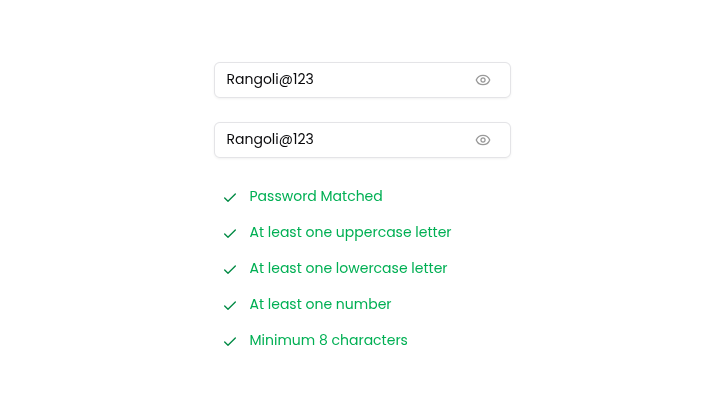
Does this depend on any other rangoli components?
Yes, Password Strength Input component depend on Password Input Component, VisitPassword Input Component Guide
Usage
anyComponent.tsx
Copy
<PasswordStrengthInput firstInputPlaceholder="New password" secondInputPlaceholder="Confirm password" />
Component Code
@app/components/PasswordStrengthInput.tsx
Copy
//Run The following command to install required shadcn component
//npx shadcn@latest add input


"use client";

import { Check, Plus } from "lucide-react";
import PasswordInput from "./PasswordInput";
import { useState } from "react";

type TPasswordStrengthInput = {
    firstInputPlaceholder: string,
    secondInputPlaceholder: string
}

export default function PasswordStrengthInput({firstInputPlaceholder, secondInputPlaceholder}: TPasswordStrengthInput) {
    const [passwordData, setPasswordData] = useState({
        password: "",
        confirmPassword: "",
    });

    // Validation checks
    const passwordsMatch = passwordData.password === passwordData.confirmPassword && passwordData.password.length !== 0;
    const hasUppercase = /[A-Z]/.test(passwordData.password);
    const hasLowercase = /[a-z]/.test(passwordData.password);
    const hasNumber = /\d/.test(passwordData.password);
    const isMinLength = passwordData.password.length >= 8;


    // Validation data
    const validationData = [
        { state: passwordsMatch, text: "Password Matched" },
        { state: hasUppercase, text: "At least one uppercase letter" },
        { state: hasLowercase, text: "At least one lowercase letter" },
        { state: hasNumber, text: "At least one number" },
        { state: isMinLength, text: "Minimum 8 characters" },
    ];

    // Handler to update state dynamically
    const handleChange = (e: React.ChangeEvent<HTMLInputElement>) => {
        setPasswordData((prev) => ({
            ...prev,
            [e.target.name]: e.target.value,
        }));
    };

    return (
        <div className="flex flex-col">
            <div className="flex flex-col gap-6">
                <PasswordInput
                    placeholder={firstInputPlaceholder}
                    name="password"
                    value={passwordData.password}
                    onChange={handleChange}
                />
                <PasswordInput
                    placeholder={secondInputPlaceholder}
                    name="confirmPassword"
                    value={passwordData.confirmPassword}
                    onChange={handleChange}
                />
            </div>

            <div className="p-2 mt-5 flex flex-col gap-3 text-sm">
                {validationData.map(({ state, text }) => (
                    <div className="flex gap-3" key={text}>
                        {state ? <Check className="w-4 text-green-700" /> : <Plus className="rotate-45 w-4 text-gray-500" />}
                        <span className={state ? "text-green-600" : "text-gray-500"}>
                            {text}
                        </span>
                    </div>
                ))}
            </div>
        </div>
    );
}